Showing posts with label Master Studies. Show all posts

Mar 6, 2012

Sargent Study

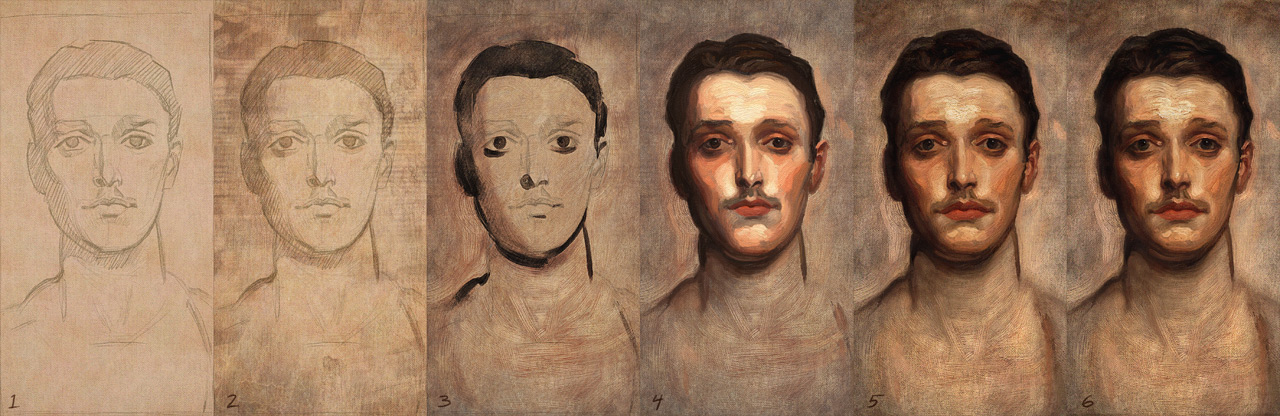
Here's another study I did using Art Rage (really love that program) and Photoshop.  This one turned out to be much more difficult than other master studies I've done.  Sargent makes it look so easy.  His portraits have this naturalness quality that you simply can't achieve unless you really slow down and look very carefully.  Besides the fact that I liked the painting as soon as I saw it, I picked this one because, one - it looked like a simple, fairly monochromatic straight-on portrait, and two - it had a lot of thin areas that I was eager to try and tackle.  Art Rage does the thick, impasto paint pretty well, but the thin areas are hard to mimic.  But boy was I wrong about this being an easy study.
Here is a rather rough progression and a detail.  I started with Art Rage and worked back and forth with Photoshop to get the canvas wash satisfactory.  In hindsight, I should have done the initial sketch and block-in with the darks (stages 1 and 3) more carefully instead of rushing in with the heavy paint thinking I could just fix it all later.  I had to do a lot more correcting of the drawing in the later stages because of that.  Overall this was a humbling experience.  You can see the image I was working from here:  http://muddycolors.blogspot.com/2012/01/art-might-online-art-museum.html

And here are some figure drawings from  a week ago.  1 mins, 10mins, and 20 min I think.

Jun 12, 2011

More studies from Leyendecker studies

Still learning from doing these, and enjoying it too.
Photoshop CS5.  I used mostly just two brushes to do these, but I put a little texture and a simple emboss effect on the highlights to give them more of the look of real oil paint.  Real oil on canvas has some body or thickness to it so it casts a little shadow on the canvas.

Apr 29, 2011

Digital Painting Exercises

   These are a bit old, but I still like them.  The first is a painting loosely based off of a great photo I came across of Vladimir Putin.  I wasn't so interested in trying to do a painting of Putin as much as I was in the  dramatic lighting and color.  Plus I wanted to try out some new brushes I created and to try and get closer to a natural, traditional media look with Photoshop CS3.
   The second is a study of one of Scott Burdick's paintings.  This time using ArtRage 2.0 on a Cintiq, I tried to see how close I could get to the look and feel of real oil on canvas.  If you're not familiar with the work of Scott Burdick and his wife, Susan Lyon, it is well worth checking out.

Mar 9, 2011

JC Leyendecker Hands

  My wife bought me a great book on the life and work of JC Leyendecker (1874 - 1951) for Christmas last year.  I've been a huge fan of his work since the first time I saw it back in college.  His paintings are so clean and well designed, and he made it look so effortless.  Unlike Norman Rockwell and many of the illustrators that followed him, he did not use photo reference at all, but did careful studies of props and models from life for each of the illustrations he created. I decided to do regular studies of his work in hopes to unlock some of secrets hidden in his flawless technique and better understand his thought process.

  Leyendecker was a master at painting hands full of character and personality.  In doing this study from one of his preparatory paintings, I could see just how much he utilized the ground as a mid tone to work back and forth with darks and lights.  The ground is a light gray and since he keeps the shadows thin, the overall effect is very luminous - a hallmark of his paintings.
  Anyway, the top image above is the study I did, and a process sequence.  The painting was done with Photoshop CS3.  The bottom image is the Leyendecker study I was working from.